The controlled close
QuickBooks Online is missing.

Configure your prepaid schedules, depreciation runs, intercompany rules, and consolidation logic once. Fynease runs the same close every month — writing approved entity-level adjusting entries back to QuickBooks Online. Consolidation elimination entries stay in Fynease as part of the consolidated close package.

The problem Automate solves

QuickBooks reports the ledger.
It doesn't run the close behind it.

Every controller using QuickBooks Online for a real business knows this. The data is there. But between the raw trial balance and the financial statements your CFO, board, or auditor needs, there's a gap — and right now that gap lives in Excel.

What QuickBooks Online doesn't do

QuickBooks Online records transactions and produces financial statements. It does that well. What it does not do is run the transformation and control workflow behind those statements — accrual schedules, cost allocations, intercompany reconciliation, foreign currency consolidation, Balance Sheet sign-off. Without that layer, the statements are a report of what was entered, not a controlled close.

So every month your team exports the trial balance, opens the prepaid schedule spreadsheet, runs the amortization table, manually calculates the deferred revenue waterfall, reconciles intercompany balances, rebuilds the consolidation model, translates foreign currencies, and assembles the financials from scratch.

It works. It's also completely manual, prone to error, and impossible to audit six months later when a question comes up. And once the close is done, there's no systematic way to reconcile and sign off every Balance Sheet account — that happens in a separate spreadsheet, if it happens at all.

What Automate does instead

Fynease Automate connects to QuickBooks Online via OAuth, pulls your trial balance and general ledger, applies your transformation logic, and produces audit-ready financials — with every adjustment traced back to source and posted back to QuickBooks Online as adjusting journal entries.

The same logic runs every month. No rebuilding. No version control problems. Give your auditor structured lead sheets, source evidence, and approval history instead of reverse-engineering a spreadsheet.

8–15
Hours saved per entity per month on close work
Based on typical controller workload
100%
Of adjustments traceable to source with timestamps
Full audit trail on every entry
No limit on entities per close
Add entities beyond your plan at $35/month each

Six steps. Configured once.
Runs every month without you rebuilding it.

Automate detects the recurring accounting logic your close needs, runs it against your QuickBooks Online data, and produces clean, audit-ready financials — with every adjusting entry traceable to its source.

01 · Detect
Auto-detect from the GL
Fynease scans your general ledger and surfaces prepaid expenses, deferred revenue, fixed assets, loans, leases, and accruals waiting to be scheduled. Evidence and confidence shown for every detection. You review, adjust, or ignore.
02 · Schedule
Configure logic once
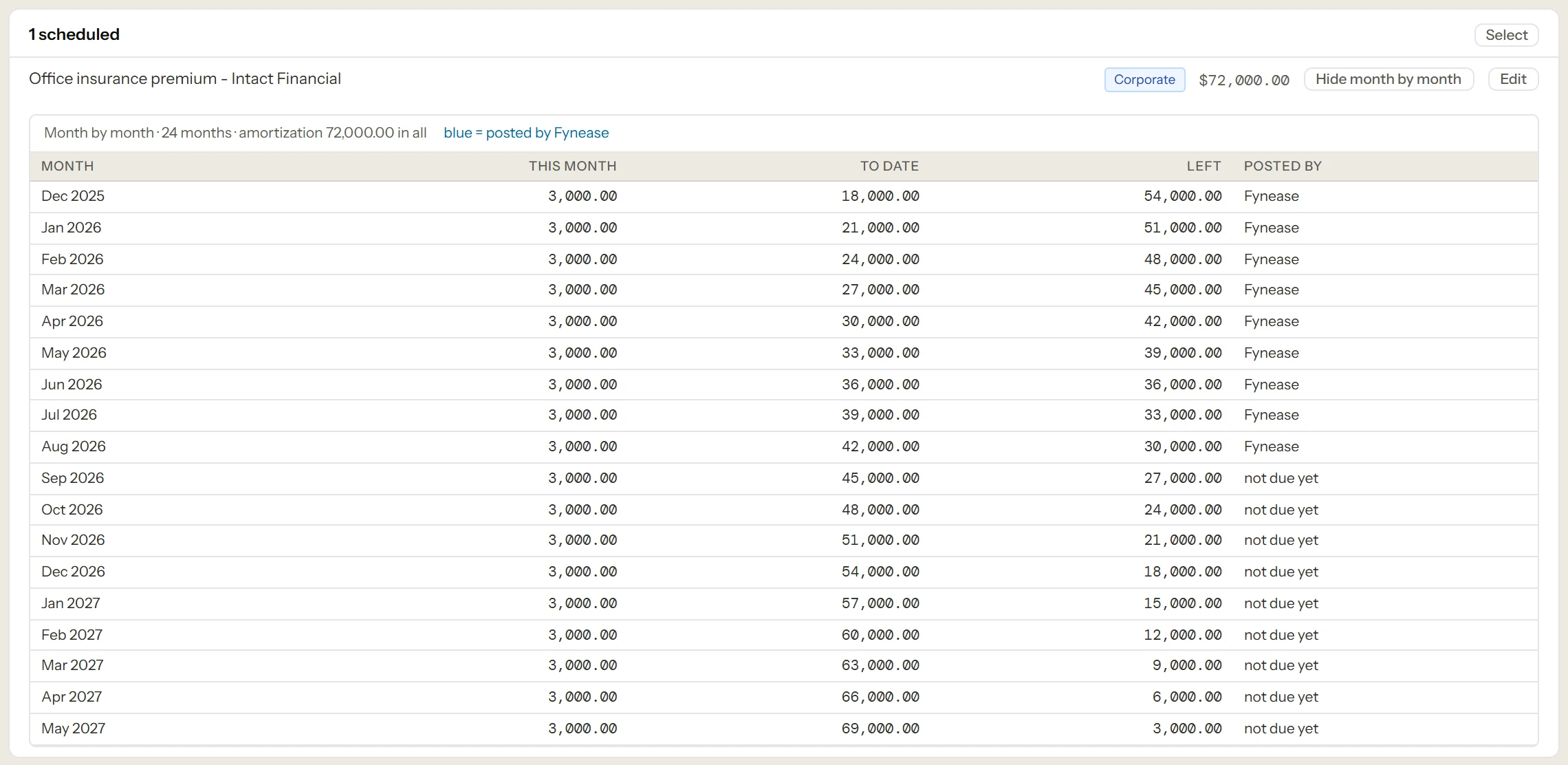
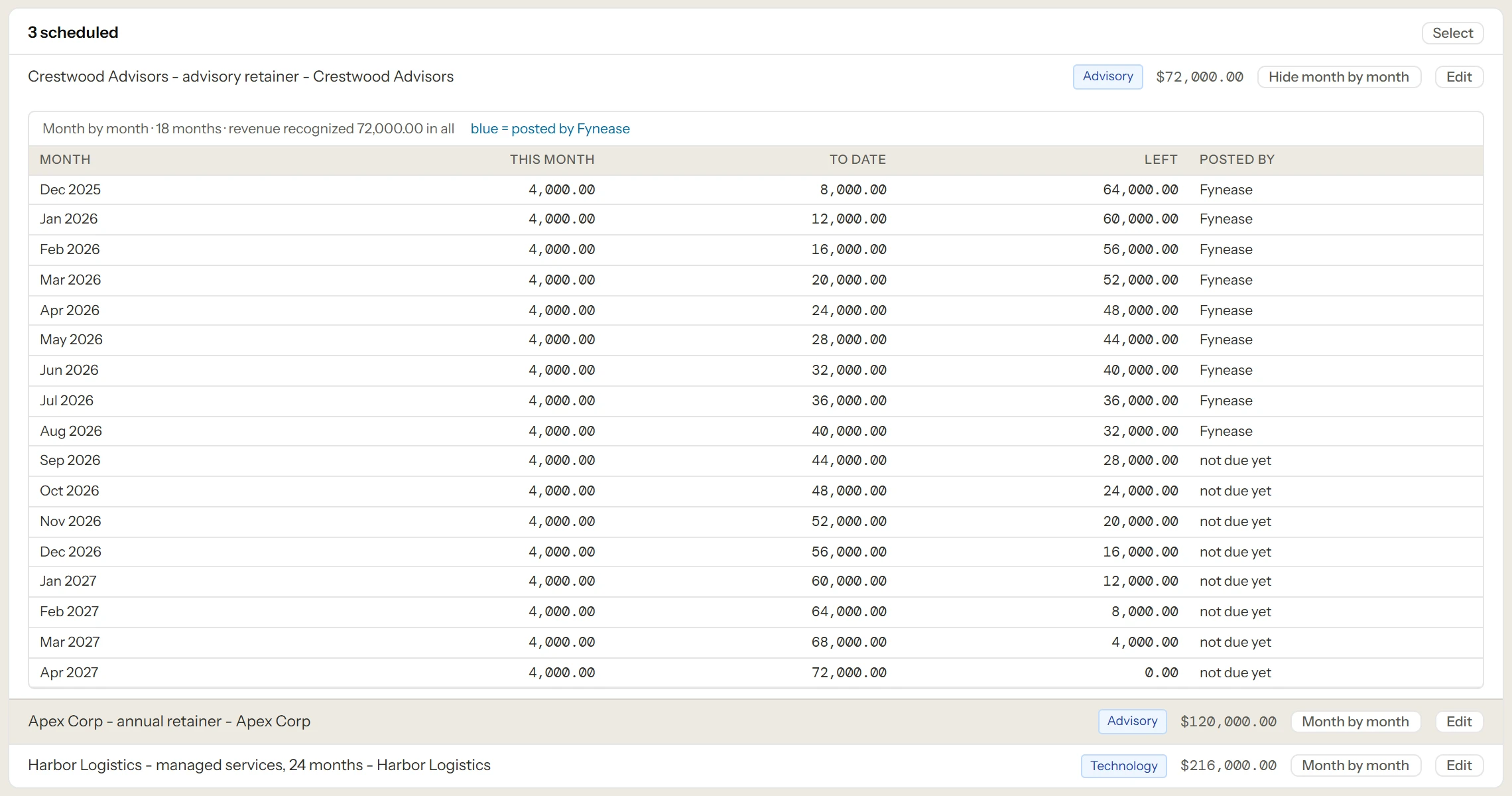
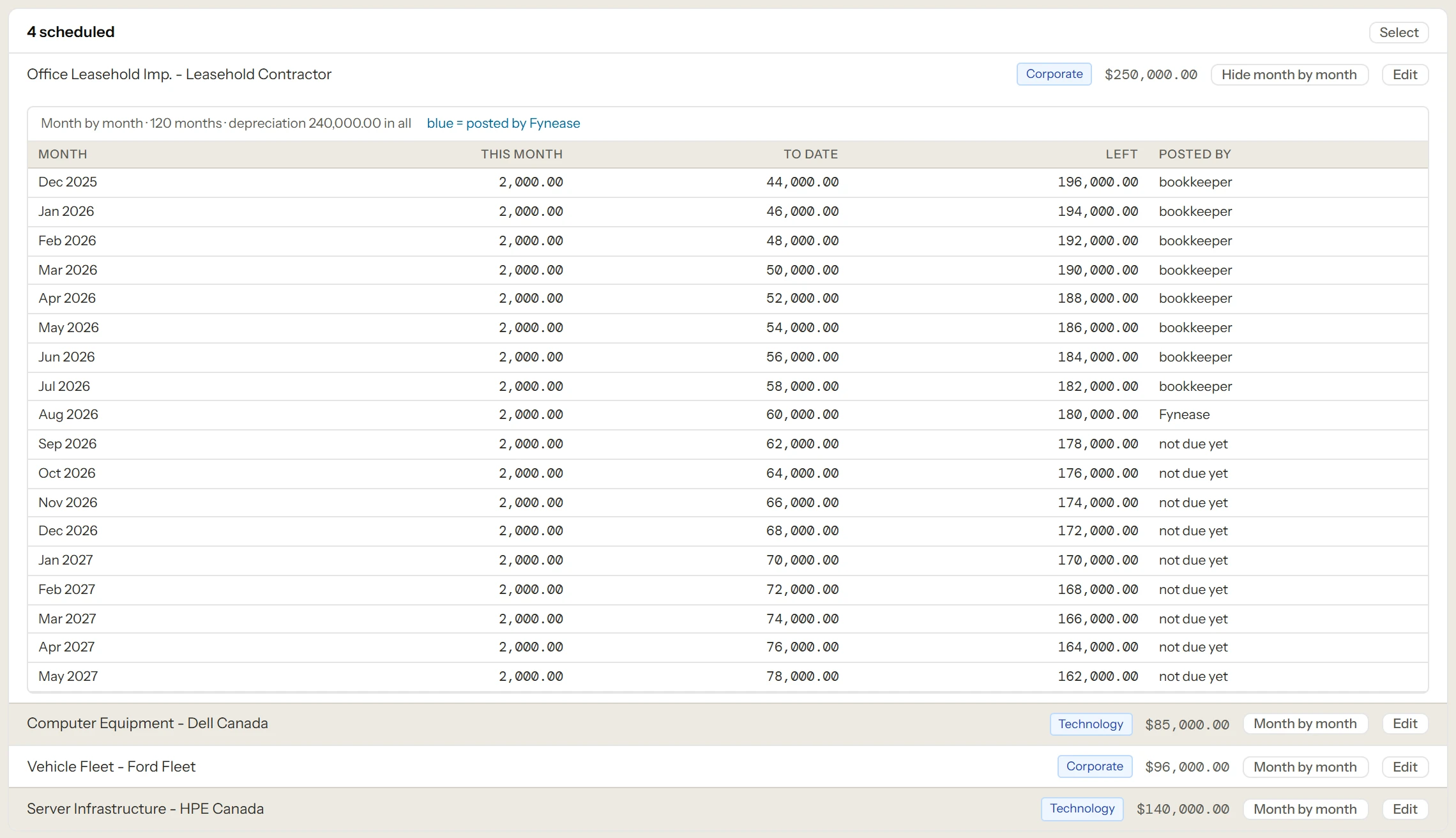
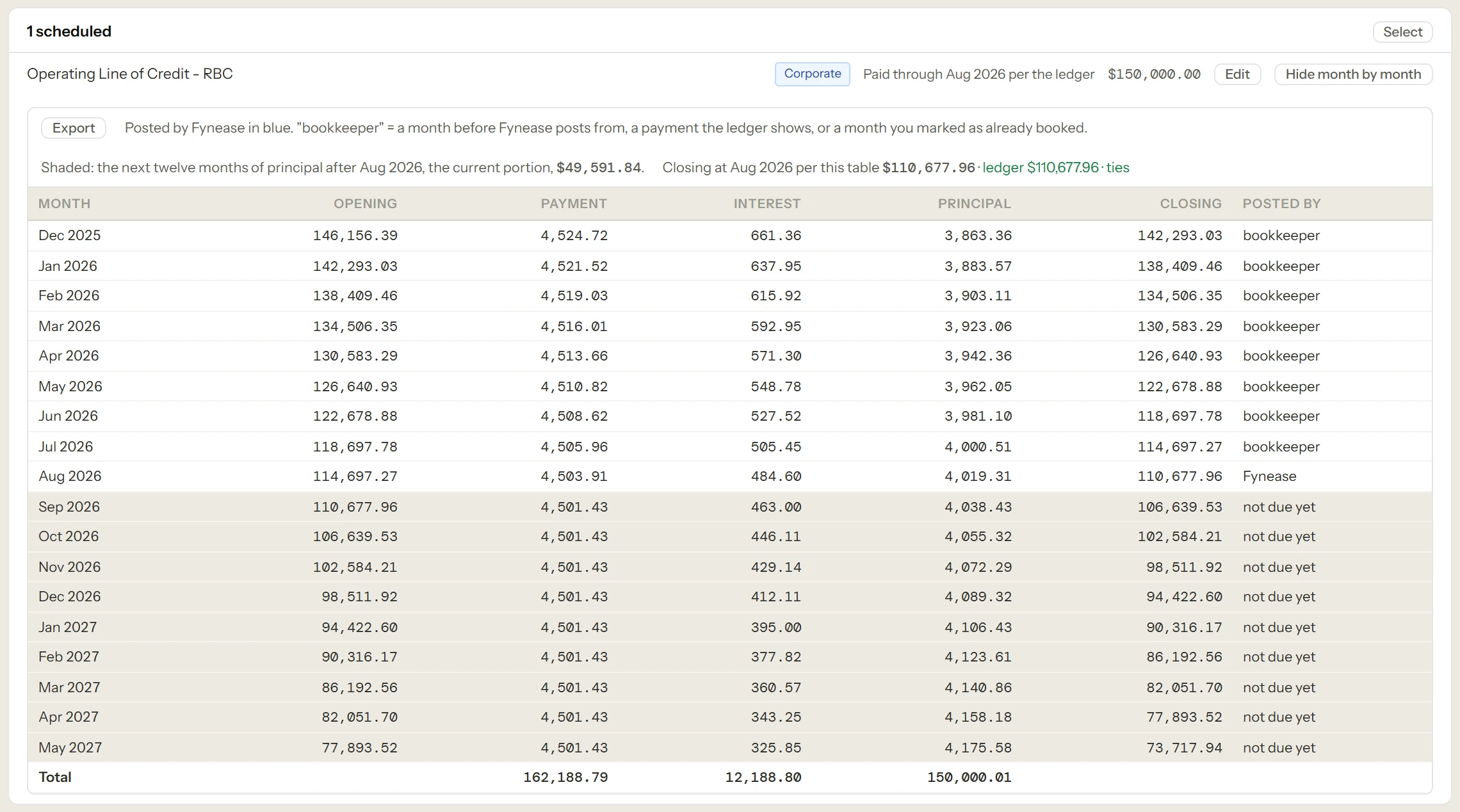
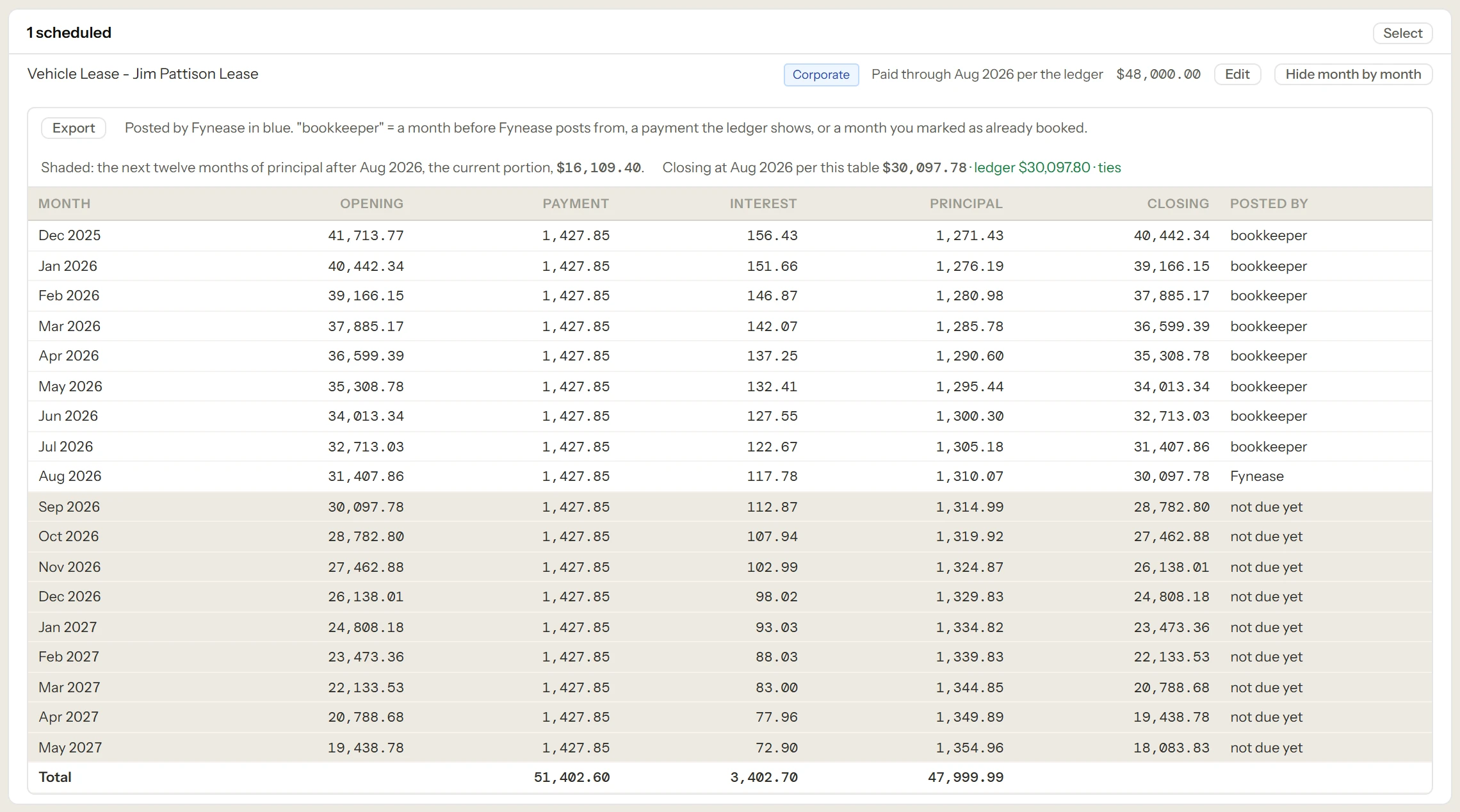
Set the amortization method, term, rate, and dimensions for each schedule. Fixed or floating rates. Cost allocations by headcount, revenue, or any custom driver. Intercompany chargebacks with both sides. Runs automatically every close cycle after that.
03 · Reconcile
Tie every account to source
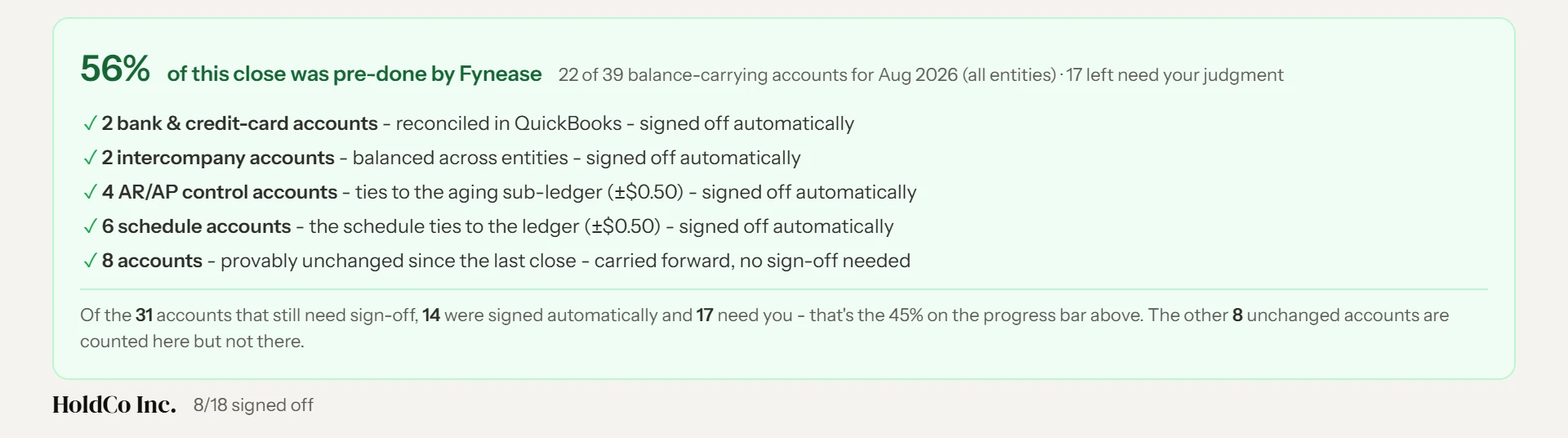
Every Balance Sheet account is analyzed against source data. AR and AP tie to aging sub-ledgers. Tax accounts roll forward by agency. Bank accounts tie to cleared balances. Intercompany balances reconcile across entities before any elimination runs.
04 · Review
Three-stage sign-off
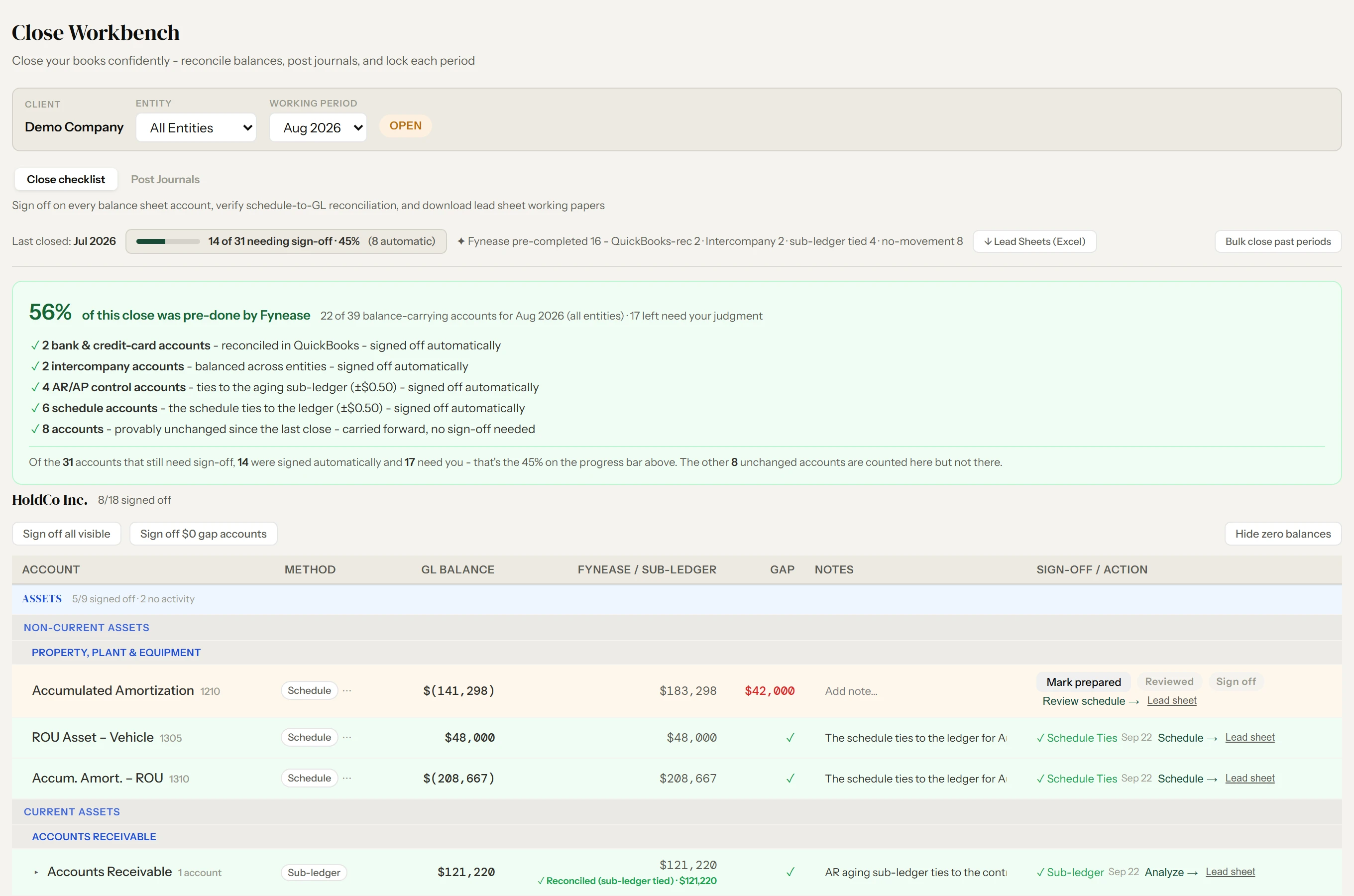
Prepared, Reviewed, Signed — account by account. Every sign-off is timestamped and attributed to the user who performed it. Carried forward automatically when nothing changed. Reviewers see exactly what changed and why.
05 · Post
Write back to QuickBooks
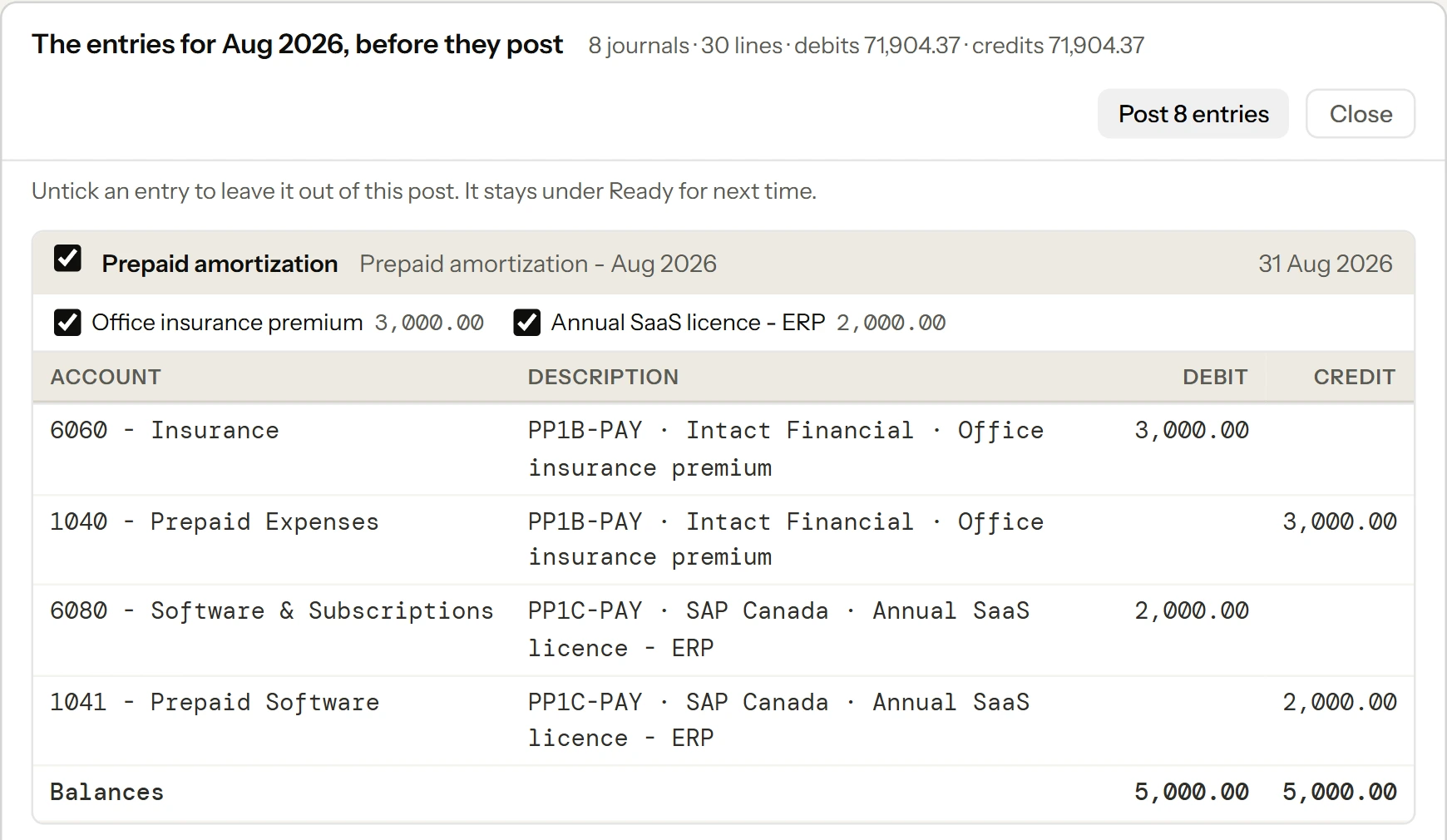
Entity-level adjusting entries post back to QuickBooks Online in one click — accruals, prepaids, depreciation, deferred revenue, loan amortization, and allocations. Consolidation-only entries stay in Fynease. Your QuickBooks books stay clean.
06 · Lock
Immutable close record
The close locks. The ledger is append-only — every change is a reversal, never a deletion. Every number traces to the schedule or journal that produced it. Reopen if needed, with full provenance on why.

The result: a close that never has to be rebuilt from scratch. The logic runs. The numbers tie. The auditor gets lead sheets. Your client gets financials they can trust.

Every recurring accounting obligation.
Not just prepaids.

Six schedule engines. Each with GL auto-detection, bulk review, and automatic journal generation. Configure once — they run every month until the obligation ends.

📋

Never rebuild another accrual schedule in Excel.

Prepaid expenses, deferred revenue, fixed asset depreciation, loan amortization, capital lease schedules. Configure once, run automatically every month with mid-stream pickup logic to avoid double-counting entries already in QuickBooks Online.

⚖️

Allocate costs without a separate spreadsheet.

Define allocation rules based on headcount, revenue, square footage, or any custom driver. Fynease applies the rules and posts allocation entries across entities automatically. No more manual cost allocation spreadsheets.

🔄

Find and fix intercompany differences before they become consolidation problems.

Manage intercompany chargebacks, reconcile balances across entities, and eliminate intercompany transactions at consolidation. Supports multi-currency intercompany flows with automatic foreign exchange translation.

🏢

Consolidate every entity — not just the QuickBooks ones.

Consolidate unlimited entities — parent companies, subsidiaries, operating companies, holding companies, real estate entities. QuickBooks Online-connected companies sync live. Non-QuickBooks entities import via monthly trial balance or GL transaction export via CSV or Excel. No entity cap.

💱

IAS 21 translation with CTA — pulled from ECB rates, not a spreadsheet.

Translate foreign currency financials using closing rates for Balance Sheet accounts and average rates for income statement accounts, in compliance with IAS 21. Supports any currency pair with ECB/Frankfurter-sourced monthly cross rates.

Know exactly what makes up every Balance Sheet account.

Every Balance Sheet account is analyzed against source within the close workflow. Review each account, reconcile adjusting entries, and sign off account by account — timestamped and user-attributed. Your auditor gets a complete reconciliation record without you having to assemble one.

📄

Hand your auditor a complete reconciliation package — not a collection of spreadsheets.

Every Balance Sheet account has a structured lead sheet showing every entry, its source, and who approved it. Reconcile and sign off each account within the close workflow — not in a separate spreadsheet. Hand the complete package directly to your auditor.

↩️

QuickBooks Online write-back

Entity-level adjusting entries — accrual schedules, prepaids, depreciation, deferred revenue, loan amortization, and cost allocations — post back to QuickBooks Online in one click after you approve them. Intercompany correcting entries and recurring intercompany templates also post to the individual entities. Consolidation elimination entries and currency translation adjustments stay in Fynease as part of the consolidated close package — they belong to the consolidation, not to any single entity's books.

📥

Not limited to QuickBooks Online.

Any entity on any accounting system joins the consolidation via monthly trial balance or GL transaction export via CSV or Excel. Holding companies, real estate entities, shell companies, or businesses on different systems all consolidate in the same engine alongside QuickBooks Online companies.

📊

Consolidated financials that tie — by construction.

Consolidated and entity-level P&L, Balance Sheet, and Cash Flow Statement — produced from your transformed, consolidation-adjusted data. Export to PDF or Excel. These are the outputs of your close, not a reporting layer — they flow into Intelligence for CFO reporting.

How QuickBooks Online integration works

Connected to QuickBooks Online.
Not dependent on it for everything.

Your QuickBooks Online credentials never touch Fynease servers. You authorize the connection directly through Intuit's OAuth flow and can revoke access at any time from your QuickBooks Online settings.

Fynease connects to QuickBooks Online via OAuth — the same secure authorization standard used by all approved QuickBooks Online apps.

What Fynease reads from QuickBooks Online

  • Trial balance — all accounts, all periods
  • General ledger — transaction-level detail for schedule engines
  • Chart of accounts — for automatic classification and mapping

What Fynease writes back to QuickBooks Online

  • Adjusting journal entries for every schedule run
  • Allocation entries across entities
  • Intercompany elimination entries

What Fynease handles outside QuickBooks Online

  • Consolidation logic — QuickBooks Online has no native consolidation
  • Foreign currency translation — IAS 21 compliant, not available in QuickBooks Online
  • Non-QuickBooks entities via CSV import
  • Audit trail and change log across all adjustments

On QuickBooks Desktop

Fynease connects natively to QuickBooks Online. If your entities are still on QuickBooks Desktop, you have two options without a full migration. Export a monthly trial balance from QuickBooks Desktop and import it into Fynease via CSV. Or migrate the active operating entities to QuickBooks Online and leave holding companies and shell entities as CSV imports in Fynease.

Many clients with large entity structures use Fynease to avoid migrating every entity to QuickBooks Online — significantly reducing their QuickBooks Online subscription cost while still getting a clean consolidated close.

Early bird pricing

From $199/month.

Every Fynease plan includes the full close workflow — accrual schedules, intercompany, consolidation, lead sheets, and the full CFO reporting stack. Plans differ by client and entity capacity.

Starter
1 client · 3 entities
Standard $249/mo
$199/mo
Solo
3 clients · 10 entities
Standard $379/mo
$299/mo
Firm
5 clients · 20 entities
Standard $649/mo
$499/mo
Scale
10 clients · 40 entities
Standard $1,299/mo
$999/mo
Extra client
$149$129/mo · $45$35/entity · Valuation $299$249/client (early bird)

Free 14-day trial · Early bird rates locked for 12 months from start date

Start free trial See full pricing

Questions about the close

Answers on how Fynease handles accruals, consolidation, write-back, and entities outside QuickBooks Online.

How does Fynease automate the month-end close?
Fynease runs a six-step workflow: it detects candidate prepaids, deferrals, loans and leases in your general ledger; you schedule the logic once; it reconciles every Balance Sheet account against source; you review and sign off in three stages; it posts approved entity-level entries back to QuickBooks Online; and the period locks into an append-only record. After the first month, the same logic runs automatically.
What adjusting entries does Fynease write back to QuickBooks Online?
Approved entity-level entries post back: accrual schedules, prepaid amortization, depreciation, deferred revenue recognition, loan amortization, and cost allocations. Intercompany correcting entries and recurring intercompany templates also post to the individual entities. Consolidation elimination entries and currency translation adjustments stay in Fynease — they belong to the consolidation, not to any single entity's books.
Can Fynease consolidate entities that are not on QuickBooks Online?
Yes. Any entity on any accounting system joins the consolidation through a monthly trial balance or GL transaction export in CSV or Excel. Holding companies, real estate entities, and businesses on other platforms consolidate in the same engine alongside QuickBooks Online companies. There is no requirement to migrate anything.
How many entities can Fynease consolidate?
There is no hard limit. Plans include a base entity count — three on Starter, rising through the tiers — and additional entities are $35 per month each. For large consolidations, contact us about volume pricing.
Does Fynease handle foreign currency consolidation?
Yes, under IAS 21. Balance Sheet accounts translate at closing rates, income statement accounts at period-average rates, and the currency translation adjustment posts automatically to other comprehensive income. Rates are sourced keyless from ECB and Frankfurter with support for intra-month averages and fixed pins.
Do I need to migrate off QuickBooks Online to use Fynease?
No. Fynease extends QuickBooks Online rather than replacing it. It connects through OAuth, reads your data, applies the close transformation, and writes approved adjusting entries back as journal entries. Your general ledger stays in QuickBooks Online and your existing setup is untouched.
What does Balance Sheet sign-off involve?
Every Balance Sheet account is analysed against source data within the close workflow, with treatment matched to account type — AR and AP tie to aging sub-ledgers, tax accounts roll forward by agency, bank accounts tie to cleared balances. Sign-off runs in three stages, Prepared, Reviewed and Signed, each timestamped and attributed to a user. Accounts with no movement carry forward automatically.
The close locks.
The briefing is ready.

Automate makes the books right. Intelligence — included in every plan — explains what they say, using the same reconciled data. There is no second assembly step, no export, and no re-keying into a reporting tool.

Five operating lanes — revenue, gross margin, operating expenses, EBITDA, and cash and runway — each answering what happened, why it happened, what happens next, and what management can do about it. Every figure traces to the schedules and adjusting entries this page describes. See the briefing →

The close you rebuild every month.
Automated.

Configure your transformation logic once. Fynease runs a clean, audit-ready close every month and posts the adjusting entries back to QuickBooks Online automatically.

Start free trial
14-day free trial · No credit card
Want CFO reporting too?
See Fynease Intelligence
Complex setup?
Contact us