You built a CFO practice.
Not a spreadsheet business.

You're spending 3–5 hours per client every month rebuilding the same reports. Fynease runs the close, then briefs your client's management team from the same reconciled data. Your time goes into advising — not assembling.

The fractional CFO capacity problem

The ceiling on your practice
isn't clients. It's hours.

Most fractional CFOs hit a wall at 8–10 clients. Not because they run out of demand. Because close work and reporting eat every hour that isn't already committed to client calls. Fynease breaks that ceiling.

⏱️

Close work that shouldn't be your job

Running prepaid schedules, posting intercompany entries, reconciling balance sheet accounts — this is controller work. But if your client doesn't have a strong controller, it lands on you. Fynease Automate handles it so you don't have to.

📊

Reports rebuilt from scratch every month

Variance analysis. KPI dashboards. Board packs. You built the template once. Now you update it every month for every client. The work is repetitive, the output is fragile, and it eats hours that should go into actual CFO work.

📈

The client you can't take on

A new client opportunity arrives. You look at your schedule and pass — you're already at capacity. Not because you're out of expertise. Because you're out of hours. Fynease gives you those hours back.

Automate the close. Automate the briefing.
Keep the judgment for yourself.

Fynease is built around the fractional CFO model — multiple clients, per-client configuration, and the same standard of output across your entire roster.

Step 1: Automate each client's close

Connect each client's QuickBooks Online companies. Configure their accrual schedules, cost allocation rules, and intercompany relationships once. Fynease runs the close every month — prepaids, depreciation, deferred revenue, loan schedules, intercompany reconciliation, consolidation, foreign currency translation — and posts approved entity-level adjusting entries back to QuickBooks Online.

Clients on QuickBooks Desktop or without a full QuickBooks Online setup import via monthly trial balance or GL transaction export and consolidate alongside QuickBooks Online-connected entities in the same engine.

Step 2: Brief your client's management team

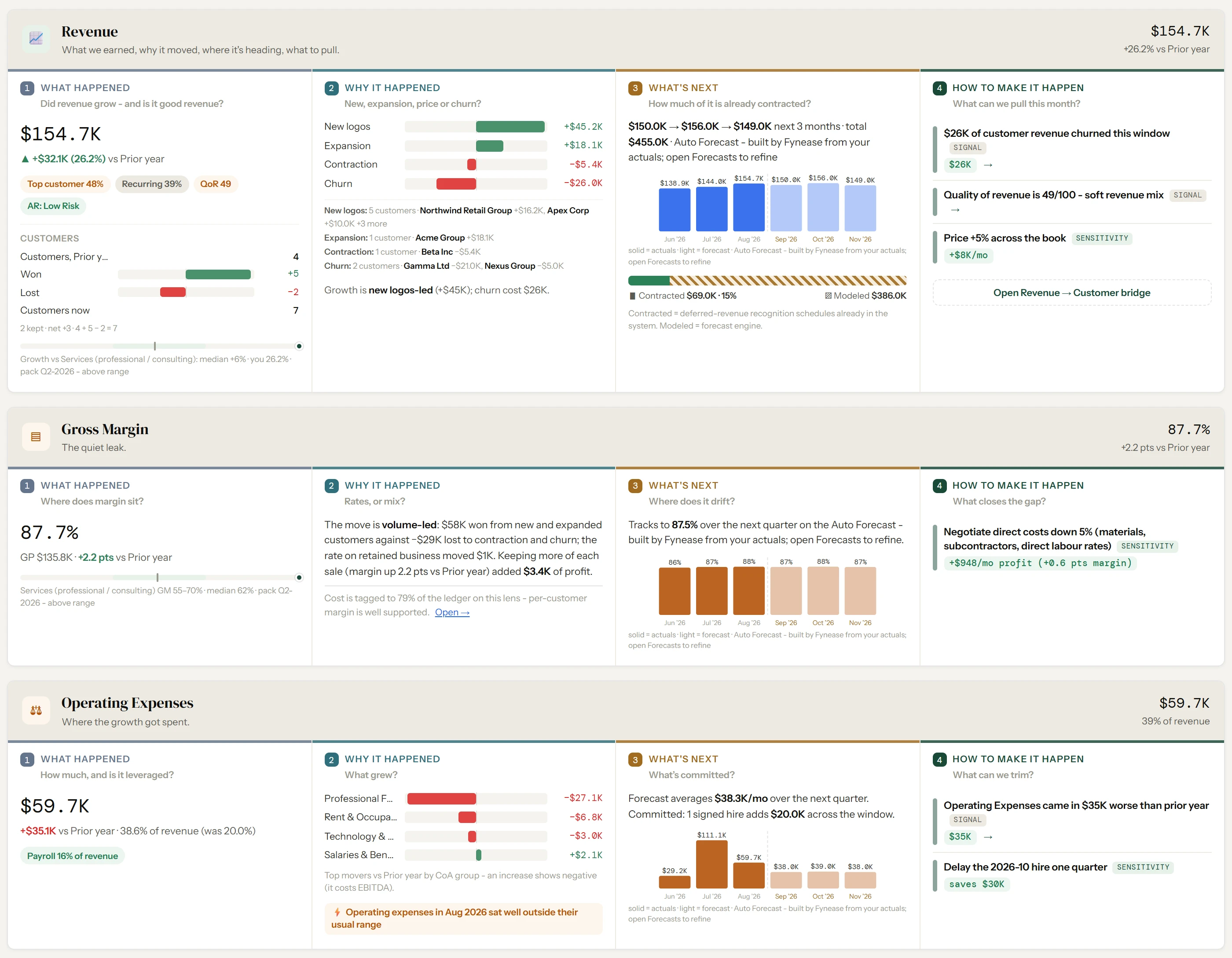
When the close locks, the briefing is ready. Eight ranked findings. Five operating lanes — Revenue, Gross Margin, Operating Expenses, EBITDA, Cash and Runway. Each answers the same four questions: what happened, why it happened, what happens next, and what management can do about it.

Every figure comes from the ledger, the schedules, or a saved forecast version. Every bridge reconciles. Every quantified lever discloses its assumption. You are not assembling the analysis — you are reviewing it, adding your judgment, and walking your client through it.

Step 3: Add Valuation for clients in a transaction

Every plan includes the close layer and the full Intelligence layer. For clients preparing for a sale or raise, add the Valuation module ($249/client/month early bird). It activates per client, only when you need it.

Valuation pulls directly from the close data — quality of earnings with GL-level scan, EBITDA normalization, DCF with calculated WACC, working capital peg, value drivers, and cap table. No re-keying, no separate import. The numbers are already clean.

What the briefing answers, every month

  • Did revenue grow — and is it good revenue?
  • New, expansion, price, or churn — what moved it?
  • How much of next quarter is already contracted?
  • Is margin leaking on rates, or on mix?
  • Where did operating expense growth actually go?
  • What did the month earn, and where does it land?
  • How much runway is left — and is a squeeze coming?
  • What can management pull this month to change the number?

Behind the briefing

  • Price-volume-mix analysis across products and customers
  • Revenue and gross margin attribution by customer
  • KPI engine with industry packs and custom metrics
  • Quality of revenue scoring — recurring vs. one-time
  • AR quality analysis and collectability scoring
  • 12–24 month forecasting with scenario modelling
  • 13-week cash flow at weekly grain
  • Board and investor pack composer

Your whole roster in one view

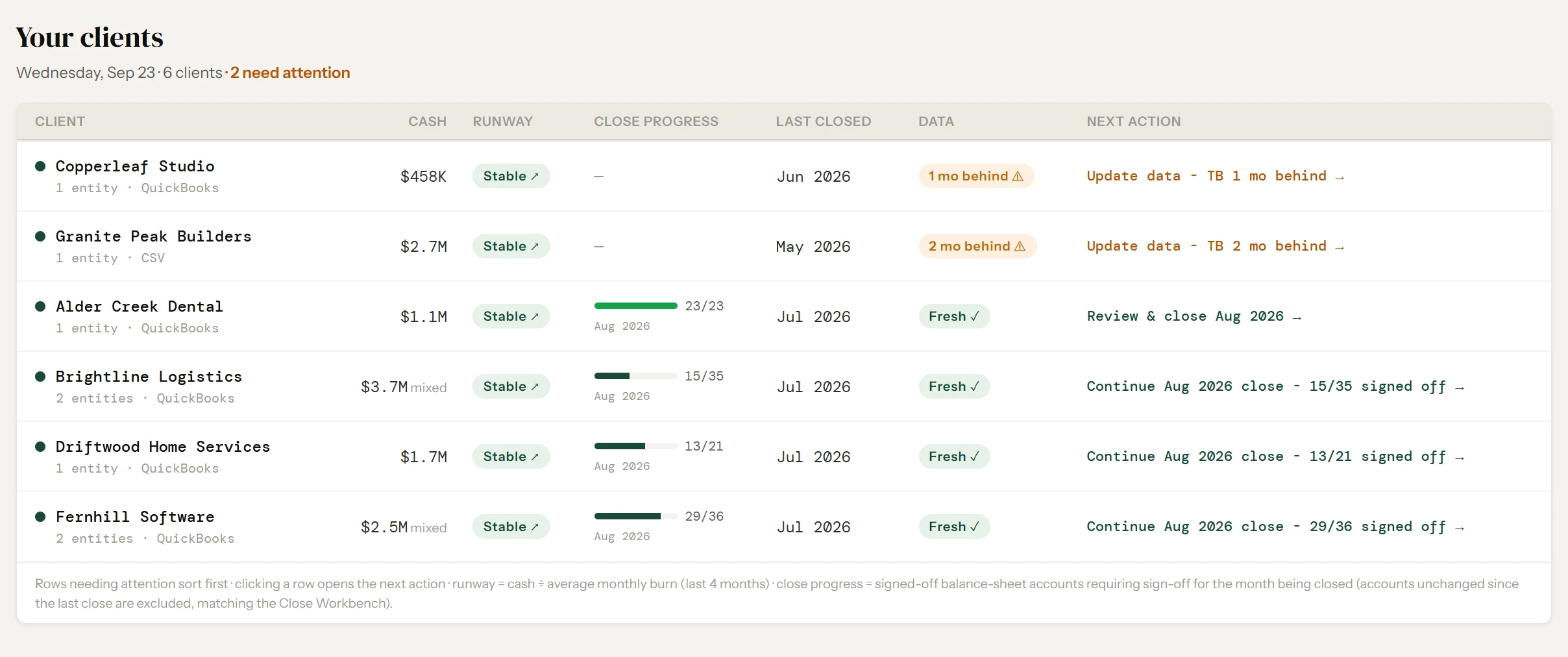
The portfolio home shows every client in your practice — close progress, runway status, outstanding items, and where your attention is needed this week. You see what needs work before you open a single client file.

Fynease briefing showing Revenue, Gross Margin, and Operating Expenses lanes, each answering what happened, why it happened, what's next, and how to make it happen

The briefing your client's management team receives — Revenue, Gross Margin, and Operating Expenses lanes. Demo data.

The capacity math

What Fynease actually does
to your practice economics.

32 hrs
Recovered per month for a CFO with 8 clients
At 4 hours per client on close and reporting
$4,800
Monthly capacity recovered at $150/hour billing rate
Before accounting for new clients you can now take on
Return on Fynease subscription for an 8-client practice
Fynease Firm plan — $499/month early bird (standard $649)

The ceiling-breaking math

If you're currently at 8 clients and spending 4 hours per client per month on close and reporting, that's 32 hours. At 10 clients it's 40 hours. The ceiling isn't expertise — it's the mechanical work that repeats every month.

Fynease reduces that to roughly 1 hour of review per client per month. At 8 clients, you recover 24 hours. At 10 clients, you recover 30 hours. That's 2–3 additional clients you can take on with the recovered capacity — before you've changed anything else about how you work.

What the recovered hours are actually worth

A fractional CFO billing $150 per hour who recovers 24 hours per month can either pocket $3,600 of recovered margin or add $7,200 of new revenue by taking on two additional clients. The Fynease subscription for that practice costs around $1,000 per month. The math is straightforward.

Your data is your clients' data

Your clients' financial data belongs to your clients. Client data is strictly isolated at the database level — no cross-account access, no benchmarking that exposes individual client data, no access by any third party. Fynease connects to QuickBooks Online via OAuth only. Your credentials never touch Fynease servers. Full details on our Security page.

Getting started

Start with one client on Automate. Pick your most QuickBooks Online-heavy client with the most complex close — prepaids, deferred revenue, intercompany, multi-entity. Configure their logic. Run one close cycle. Once you see how it works, rollout to the rest of your roster takes an afternoon per client.

Plans built for practices. Not per-feature billing.

Early bird pricing

Every plan includes both the close layer and the full CFO reporting stack. Early bird rates lock in for 12 months — pricing increases at general availability. Add clients or entities as you grow. Valuation add-on ($249 early bird, $299 standard) activates per client for QoE and exit readiness work.

Solo practice · 3 clients

Solo plan — close + full CFO reporting included
Solo plan (3 clients, 10 entities)$299
Monthly
$379 standard
$299
Replaces ~$2,700/mo of close and reporting work

Growing practice · 6 clients

Firm plan + 1 extra client — full CFO reporting
Firm plan (5 clients, 20 entities)$499
1 extra client$129
Monthly
$778 standard
$628
Replaces ~$5,400/mo of labor

Established practice · 10 clients

Scale plan — full roster, all features
Scale plan (10 clients, 40 entities)$999
Monthly $999
Replaces ~$9,000/mo of labor
Start free trial Full pricing details

Questions from fractional CFOs

Answers on managing multiple clients, data isolation, pricing, and what changes in your delivery model.

How does Fynease help a fractional CFO practice scale?
It removes the work that scales linearly with client count — accrual schedules, intercompany reconciliation, consolidation, and the monthly reporting rebuild. A practice managing six clients typically recovers 18 to 30 hours a month, which can go to new clients or to higher-value advisory work. The constraint on most practices is close capacity, not demand.
Can I manage multiple clients from one Fynease account?
Yes. Fynease is built around the firm-client-entity structure. Each client's data is isolated, with separate close workflows, reporting, and briefings, all managed from a single account. The portfolio home shows close progress, runway status, and outstanding items across every client so you know what needs attention before opening a file.
Is my clients' data visible to other firms using Fynease?
No. Client data is isolated at the database level through row-level security. No other firm can access your clients' financials. Fynease does not use client data for benchmarking, model training, or any purpose outside your engagement, and connects to QuickBooks Online through OAuth so credentials never reach Fynease servers.
What do I actually deliver to my clients with Fynease?
A clean, signed-off close with audit-ready lead sheets, and a monthly management briefing covering revenue, gross margin, operating expenses, EBITDA, and cash and runway. Each lane explains what happened, why, what is already committed, and which levers are available. For clients in a transaction, the Valuation add-on produces a quality of earnings, DCF, and working capital peg from the same data.
How is Fynease priced for a practice with multiple clients?
By client and entity capacity, not by feature. Early bird pricing runs from $199 per month for one client and three entities, through Solo at $299 for three clients, Firm at $499 for five, and Scale at $999 for ten. Additional clients are $129 per month and additional entities $35. Every plan includes the full close layer and the full Intelligence layer.
Do my clients need to leave QuickBooks Online?
No, and that is the point. Fynease is built for practices whose clients have outgrown Excel but have no reason to move to an ERP. It connects to QuickBooks Online, runs the close, and writes approved adjusting entries back. Clients on other systems can still be consolidated through trial balance or GL import.
How quickly can I get a new client running?
Connect their QuickBooks Online companies through OAuth, then configure accrual schedules, intercompany rules, and consolidation structure. Fynease detects candidate schedules from the general ledger, so most of the setup is reviewing and confirming rather than building from scratch. After the first close, the configuration runs automatically each period.
Take on two more clients
with the hours Fynease gives back.

Every new account starts with a free 14-day trial. Full access to the close layer and Intelligence. No credit card required.

Start free trial
14-day free trial · No credit card
Learn more
See everything Intelligence includes
Want a walkthrough?
Contact us