How Fynease compares › Close automation

Month-end close automation.

Close automation is software that does part of the month-end close for you: booking recurring entries, running the checklist, or reconciling accounts. The tools differ in how much of the close they cover, whether they post to the ledger, and whether they work across several companies or one file at a time.

What these tools do

  • Book recurring entries from schedules: prepaid expenses, depreciation, and in some tools loans, leases and accruals
  • Run a close checklist with review and sign-off
  • Reconcile bank and other accounts, often with AI matching
  • Post entries back to the ledger, so the books carry them

Where Fynease fits

  • The whole close across every company in a group: schedules, intercompany, consolidation, and every Balance Sheet account signed off
  • Entries posted back to QuickBooks Online after approval, with lead sheets for the auditor
  • The management briefing and board pack built from the same closed books
  • QuickBooks Online stays the book of record

Try it on your own QuickBooks Online company. 14-day free trial, no credit card required.

Start free trial See pricing
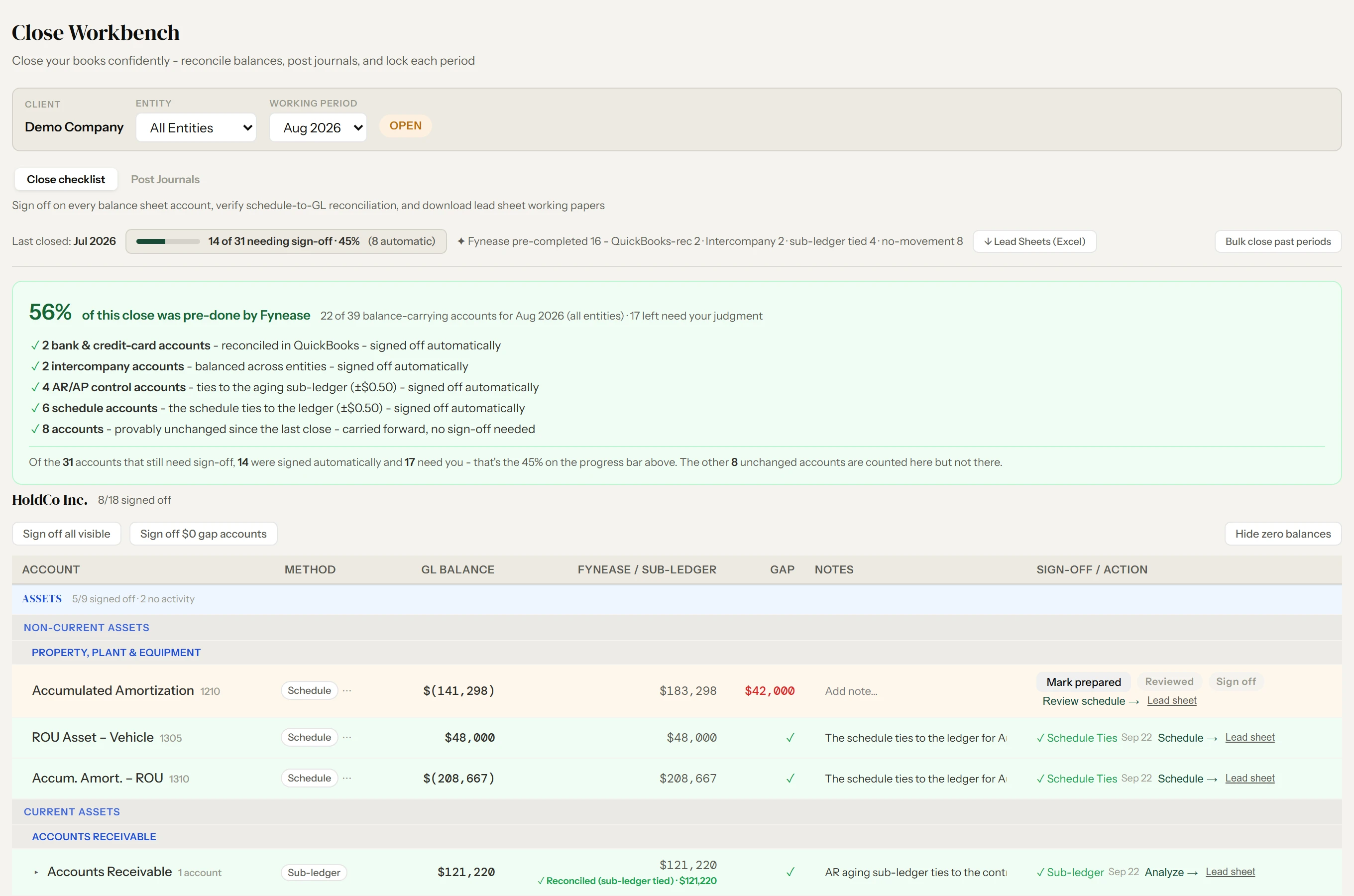
Fynease Close Workbench for August 2026, all entities: 56% of this close was pre-done by Fynease, 22 of 39 balance-carrying accounts. Bank accounts reconciled in QuickBooks, the intercompany pair balanced, AR and AP tied to their agings, six schedule accounts tied to the ledger, and eight accounts unchanged since the last close were all signed off or carried forward automatically; 17 accounts are left for the controller's judgment

Close Workbench · what Fynease tied and signed off, and what is left for review · Demo data

Where AI accounting agents fit

A newer group of products describe themselves as AI accountants or accounting agents: software that categorizes, reconciles and drafts entries with a person reviewing the result. They belong in this category because the job is the same, getting the month closed, and the questions to ask are the same: what does it post, what does a person approve before it posts, and can every figure be traced back to the ledger.

Fynease infers schedules and matches from the ledger, proposes the entries, and posts nothing until someone approves it. The figures on every statement and in every briefing come from the closed books, never from a model.

What each close tool covers

Each product’s capabilities and prices are taken from its own published website and help documentation, checked September 2026. “Not described” means we could not find the capability documented; it is not a claim that it cannot be done. “Not compared” means we have not checked that row for that product.

Sources: FinOptimal: Pricing, Accruer setup, Month-end close guide · nettTracker: Pricing, Integrations, Features · Double: Plan prices, Pricing, Trial, Keeper is now Double, Accruals, Multiple accounting files, AI credits · Truewind: Homepage, Product, Support center, Sage Intacct partner page, CAS firms, Trust and security

Feature Fynease FinOptimal nettTracker Double Truewind
Prepaid, deferred revenue and depreciation schedulesYesYes: Accruer
Booked automatically from “for the period” tags
Yes
Period or daily resolution; holding status for deposits
Yes: Scale tier
Prepaid expenses, fixed assets, accrued expenses, revenue recognition; posted from the Close page; US QuickBooks Online files
Prepaids and fixed assets
Prepaid amortization and depreciation schedules are documented; deferred revenue is not in the help center
Loan and lease schedulesYesVia Booker
Built in Google Sheets workpapers, then synced as journal entries
Yes
Right-of-use asset and liability; linear or sum-of-digits loan interest
Loan amortization on Scale
Lease schedules not described
Not described
Cost allocationsYesVia Booker
Spreadsheet-driven
NoYes: Scale tier
Split balances or transactions across classes and locations by percentage, amount, or revenue share
Not described
Posting entries back to QuickBooks OnlineYes: one click after approvalYes
Accruer books entries; Booker syncs journals and transactions
Yes
Automatic posting on the last day of the month, optional; can split by class or location
Yes: strong
Two-way sync; edits, splits, journals, bills, invoices, and deposits post with human review
Posts to Sage Intacct
Posting back to QuickBooks Online is not described
Close checklist and task workflowClose workflow with three-stage sign-off and portfolio view
Not a general task manager
Not comparedNot comparedYes: Double strength
Templates, recurring tasks, assignments, due dates, chat, daily digest, dashboard across clients
Yes
Close checklist with evidence on each task, reviewer routing and approvals
Balance Sheet reconciliation and sign-offYes: every account, three-stage sign-off, timestampedNot described
No close checklist or approval workflow documented
Dashboard reconciliation
Register total against ledger balance per module; no sign-off or approval workflow
Reconciliation tasks
Ledger vs statement balance per account, AI reconciliations, task completion; no lead sheets or staged sign-off described
Bank, deposit and receivables reconciliations
With review and sign-off; a reconciliation of every Balance Sheet account is not described
Audit trail and lead sheetsYesExportable accrual schedules
No change log described
Changes-detected and deleted-items logTask activity logs and accrual audit historyAudit history and posting evidence
Intercompany reconciliation and eliminationYes: reconciles, then eliminatesNot describedNoDue To/From reconciliation
Reconciles balances across files; no elimination, because there is no consolidation
Not described
Multi-entity consolidationYes: QuickBooks Online + CSV/Excel entitiesNot a product feature
One instance per entity; consolidate in a parent Google Sheets workbook
No
Each company is a separate file
NoNot described
Multi-entity reconciliations are described; a consolidation is not
Ledger connectionsQuickBooks Online natively; any other system via trial balance or GL import (CSV/Excel)No: QuickBooks Online onlyQuickBooks Online, Xero, Sage Accounting two-way; journal export for NetSuite, Sage Intacct, Zoho Books, CSV/Excel; standalone modeQuickBooks Online and Xero two-way; NetSuite and Sage Intacct listed as two-way for in-house teams
Schedules and AI bank feeds are QuickBooks Online-only
QuickBooks Online, Sage Intacct, Intuit Enterprise Suite
AIDetection and classification only; every figure deterministicNone claimedNone claimedNot comparedCategorization, matching, anomaly detection, a workpaper agent
Human review before posting where the workflow requires it
Pricing (published)From $199/month early bird (standard $249); 1 client, 3 entities, Automate and Intelligence included (Valuation is a per-client add-on); 14-day free trialAccruer $29 to $199/month per QuickBooks Online file by entry count; Booker $99; Wrangler $99; Magic Bundle from $339/month; firms pay per client with volume discountsSmall Business £10/month (one company, 50 assets); Professional from £30/month per company, plus £7.50/month for each block of five additional companies; GBP only; 14-day trialPer connected client, unlimited users: Core $10, Plus $25, Scale $50 per client per month, as published in Double’s own announcement; in-house teams on an annual contract; demo-first, a free trial offered after a demoNot published; demo on request

Common questions

What is month-end close automation software?

Software that does part of the month-end close: booking recurring entries from schedules, running a close checklist, reconciling accounts, and posting the results to the ledger. Some tools cover one piece, such as schedules for one company file; others cover the close end to end.

What month-end close tools work with QuickBooks Online?

FinOptimal and nettTracker book schedules for a QuickBooks Online file. Double runs the close workflow and client portal for firms, with schedules on its Scale tier. Truewind reconciles accounts and runs prepaid and fixed asset schedules for QuickBooks Online and Sage Intacct companies, and documents posting back to Sage Intacct. Fynease runs the close across every company in a group: schedules, intercompany, consolidation and sign-off, posting approved entries back to QuickBooks Online.

Is an AI accounting agent the same as close automation?

It is one way of doing it. An AI accounting agent categorizes, matches and drafts entries for a person to review. The questions to ask any close tool are the same: what it posts, what a person approves first, and whether every figure traces back to the ledger.

Do I still need a reporting tool if I automate the close?

Not with Fynease: the briefing, board pack and forecast are built from the closed books. With a close tool that stops at the ledger, a reporting tool such as Fathom or Syft usually sits on top. Reporting and FP&A tools compared.

Other categories: Consolidation · Reporting and FP&A · ERP or QuickBooks

Automate the whole close,
not one piece of it.

Fynease runs the schedules, reconciles and signs off every account, handles intercompany and consolidation, and briefs management from the result.

Start free trial